Simeon DealerShip 2.5





.jpg)
.jpg)
.jpg)
7530
87
7530
87
Changelog:
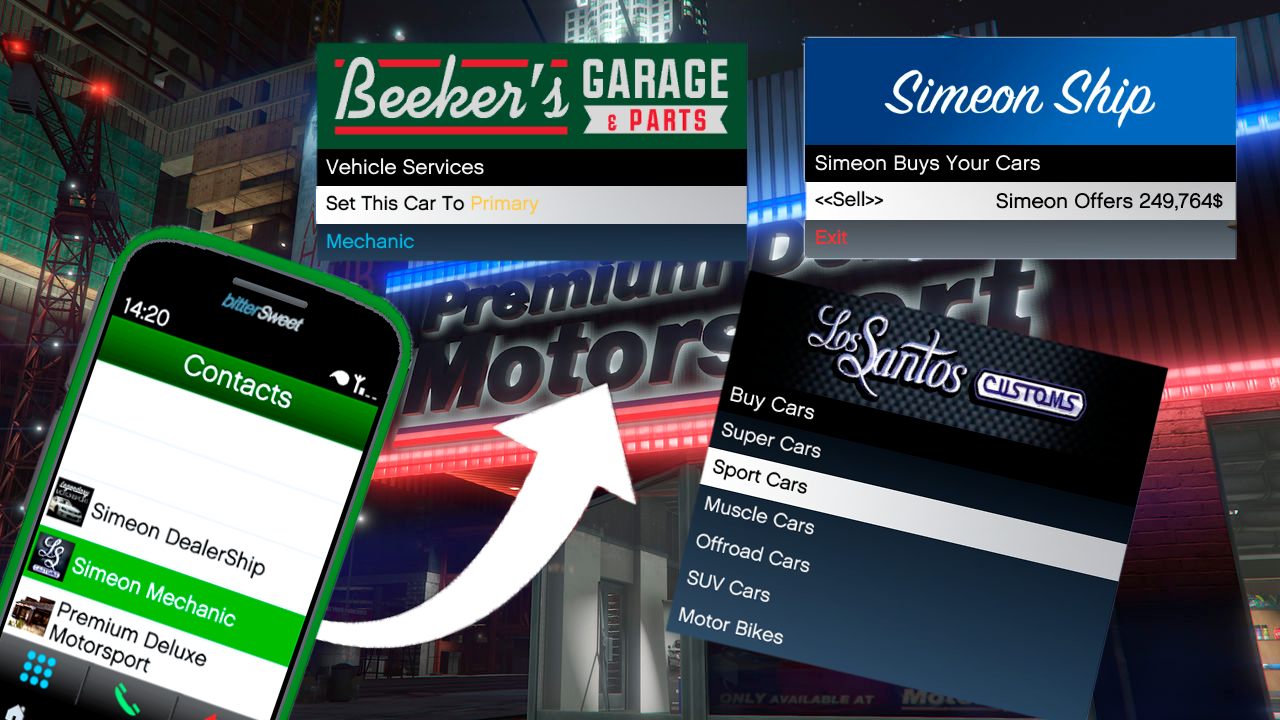
2.0 --> Added Cool Banners To Menus, Added a Phone Number For Ability To Buy Cars For a Certain Amount Of Money
2.5 --> Improved Money System : Realistic Prices And Some Improvments Based On @HRHGJR4 Recommendations
Mod Installation Instructions:
Requirements:
GTA 5 installed on your PC.
Script Hook V: Download Here: https://dev-c.com/gtav/scripthookv/
Script Hook V .NET: Download Here: https://www.gta5-mods.com/tools/scripthookv-net
NativeUI: Download Here: https://github.com/Guad/NativeUI/releases
Ifruitaddon2:DownloadHere:https://github.com/Bob74/iFruitAddon2/releases/download/v2.1.0/iFruitAddon2-2.1.0.zip
Installation Steps:
Download Required Files:
Download Script Hook V, Script Hook V .NET, and NativeUI from the provided links.
Install Script Hook V:
Copy all files from the Script Hook V ZIP into your GTA 5 game directory (where GTA5.exe is located).
Install Script Hook V .NET:
Copy all files from the Script Hook V .NET ZIP into your GTA 5 game directory.
Install NativeUI:
Copy NativeUI.dll from the NativeUI ZIP into the "scripts" folder within your GTA 5 game directory.
Install Ifruitaddon2:
Copy ifruitaddon2.dll from the iFruitAddon2-2.1.0 ZIP into the "scripts" folder within your GTA 5 game directory.
Install The Mod:
Download the mod files.
Extract or copy the mod files into your GTA 5 "scripts" folder, create one if not done already.
Verify Installation:
Ensure that the following files are present in your GTA 5 game directory:
ScriptHookV.dll
dinput8.dll
ScriptHookVDotNet.asi
ScriptHookVDotNet.ini
ScriptHookVDotNet2.dll
ScriptHookVDotNet2.xml
ScriptHookVDotNet3.dll
ScriptHookVDotNet3.xml
(scripts folder) NativeUI.dll
(scripts folder) ifruitaddon2.dll
(scripts folder) SimeonDealerShip.dll
Launch the Game:
Start GTA 5 as you normally would.
Your mod should be active if installed correctly.
Open Phone And Scroll All The Way Down
Troubleshooting:
Ensure you have the latest versions of Script Hook V, Script Hook V .NET, NativeUI And Ifruitaddon2.
Check for any error messages in the game or in the script logs for troubleshooting.
Enjoy your modded GTA 5 experience!
2.0 --> Added Cool Banners To Menus, Added a Phone Number For Ability To Buy Cars For a Certain Amount Of Money
2.5 --> Improved Money System : Realistic Prices And Some Improvments Based On @HRHGJR4 Recommendations
Mod Installation Instructions:
Requirements:
GTA 5 installed on your PC.
Script Hook V: Download Here: https://dev-c.com/gtav/scripthookv/
Script Hook V .NET: Download Here: https://www.gta5-mods.com/tools/scripthookv-net
NativeUI: Download Here: https://github.com/Guad/NativeUI/releases
Ifruitaddon2:DownloadHere:https://github.com/Bob74/iFruitAddon2/releases/download/v2.1.0/iFruitAddon2-2.1.0.zip
Installation Steps:
Download Required Files:
Download Script Hook V, Script Hook V .NET, and NativeUI from the provided links.
Install Script Hook V:
Copy all files from the Script Hook V ZIP into your GTA 5 game directory (where GTA5.exe is located).
Install Script Hook V .NET:
Copy all files from the Script Hook V .NET ZIP into your GTA 5 game directory.
Install NativeUI:
Copy NativeUI.dll from the NativeUI ZIP into the "scripts" folder within your GTA 5 game directory.
Install Ifruitaddon2:
Copy ifruitaddon2.dll from the iFruitAddon2-2.1.0 ZIP into the "scripts" folder within your GTA 5 game directory.
Install The Mod:
Download the mod files.
Extract or copy the mod files into your GTA 5 "scripts" folder, create one if not done already.
Verify Installation:
Ensure that the following files are present in your GTA 5 game directory:
ScriptHookV.dll
dinput8.dll
ScriptHookVDotNet.asi
ScriptHookVDotNet.ini
ScriptHookVDotNet2.dll
ScriptHookVDotNet2.xml
ScriptHookVDotNet3.dll
ScriptHookVDotNet3.xml
(scripts folder) NativeUI.dll
(scripts folder) ifruitaddon2.dll
(scripts folder) SimeonDealerShip.dll
Launch the Game:
Start GTA 5 as you normally would.
Your mod should be active if installed correctly.
Open Phone And Scroll All The Way Down
Troubleshooting:
Ensure you have the latest versions of Script Hook V, Script Hook V .NET, NativeUI And Ifruitaddon2.
Check for any error messages in the game or in the script logs for troubleshooting.
Enjoy your modded GTA 5 experience!
Först uppladdad: 29 januari 2024
Senast uppdaterad: 5 februari 2024
Senast nedladdad: 2 timmar sedan
28 Kommentarer
More mods by 5Alpha5:
Changelog:
2.0 --> Added Cool Banners To Menus, Added a Phone Number For Ability To Buy Cars For a Certain Amount Of Money
2.5 --> Improved Money System : Realistic Prices And Some Improvments Based On @HRHGJR4 Recommendations
Mod Installation Instructions:
Requirements:
GTA 5 installed on your PC.
Script Hook V: Download Here: https://dev-c.com/gtav/scripthookv/
Script Hook V .NET: Download Here: https://www.gta5-mods.com/tools/scripthookv-net
NativeUI: Download Here: https://github.com/Guad/NativeUI/releases
Ifruitaddon2:DownloadHere:https://github.com/Bob74/iFruitAddon2/releases/download/v2.1.0/iFruitAddon2-2.1.0.zip
Installation Steps:
Download Required Files:
Download Script Hook V, Script Hook V .NET, and NativeUI from the provided links.
Install Script Hook V:
Copy all files from the Script Hook V ZIP into your GTA 5 game directory (where GTA5.exe is located).
Install Script Hook V .NET:
Copy all files from the Script Hook V .NET ZIP into your GTA 5 game directory.
Install NativeUI:
Copy NativeUI.dll from the NativeUI ZIP into the "scripts" folder within your GTA 5 game directory.
Install Ifruitaddon2:
Copy ifruitaddon2.dll from the iFruitAddon2-2.1.0 ZIP into the "scripts" folder within your GTA 5 game directory.
Install The Mod:
Download the mod files.
Extract or copy the mod files into your GTA 5 "scripts" folder, create one if not done already.
Verify Installation:
Ensure that the following files are present in your GTA 5 game directory:
ScriptHookV.dll
dinput8.dll
ScriptHookVDotNet.asi
ScriptHookVDotNet.ini
ScriptHookVDotNet2.dll
ScriptHookVDotNet2.xml
ScriptHookVDotNet3.dll
ScriptHookVDotNet3.xml
(scripts folder) NativeUI.dll
(scripts folder) ifruitaddon2.dll
(scripts folder) SimeonDealerShip.dll
Launch the Game:
Start GTA 5 as you normally would.
Your mod should be active if installed correctly.
Open Phone And Scroll All The Way Down
Troubleshooting:
Ensure you have the latest versions of Script Hook V, Script Hook V .NET, NativeUI And Ifruitaddon2.
Check for any error messages in the game or in the script logs for troubleshooting.
Enjoy your modded GTA 5 experience!
2.0 --> Added Cool Banners To Menus, Added a Phone Number For Ability To Buy Cars For a Certain Amount Of Money
2.5 --> Improved Money System : Realistic Prices And Some Improvments Based On @HRHGJR4 Recommendations
Mod Installation Instructions:
Requirements:
GTA 5 installed on your PC.
Script Hook V: Download Here: https://dev-c.com/gtav/scripthookv/
Script Hook V .NET: Download Here: https://www.gta5-mods.com/tools/scripthookv-net
NativeUI: Download Here: https://github.com/Guad/NativeUI/releases
Ifruitaddon2:DownloadHere:https://github.com/Bob74/iFruitAddon2/releases/download/v2.1.0/iFruitAddon2-2.1.0.zip
Installation Steps:
Download Required Files:
Download Script Hook V, Script Hook V .NET, and NativeUI from the provided links.
Install Script Hook V:
Copy all files from the Script Hook V ZIP into your GTA 5 game directory (where GTA5.exe is located).
Install Script Hook V .NET:
Copy all files from the Script Hook V .NET ZIP into your GTA 5 game directory.
Install NativeUI:
Copy NativeUI.dll from the NativeUI ZIP into the "scripts" folder within your GTA 5 game directory.
Install Ifruitaddon2:
Copy ifruitaddon2.dll from the iFruitAddon2-2.1.0 ZIP into the "scripts" folder within your GTA 5 game directory.
Install The Mod:
Download the mod files.
Extract or copy the mod files into your GTA 5 "scripts" folder, create one if not done already.
Verify Installation:
Ensure that the following files are present in your GTA 5 game directory:
ScriptHookV.dll
dinput8.dll
ScriptHookVDotNet.asi
ScriptHookVDotNet.ini
ScriptHookVDotNet2.dll
ScriptHookVDotNet2.xml
ScriptHookVDotNet3.dll
ScriptHookVDotNet3.xml
(scripts folder) NativeUI.dll
(scripts folder) ifruitaddon2.dll
(scripts folder) SimeonDealerShip.dll
Launch the Game:
Start GTA 5 as you normally would.
Your mod should be active if installed correctly.
Open Phone And Scroll All The Way Down
Troubleshooting:
Ensure you have the latest versions of Script Hook V, Script Hook V .NET, NativeUI And Ifruitaddon2.
Check for any error messages in the game or in the script logs for troubleshooting.
Enjoy your modded GTA 5 experience!
Först uppladdad: 29 januari 2024
Senast uppdaterad: 5 februari 2024
Senast nedladdad: 2 timmar sedan
 5mods on Discord

BIG UPDATE PENDING … 💥
@5Alpha5 Just make the price kind of realistic .. well that will be my personal preference
@HRHGJR4 you have some good ideas that definitely would make this mod wayyyy better
Nice mod if we can get some real prices will be better
https://youtu.be/BnKy1SGfn9M?si=97l0BonwcSybaL13
Please update to LemonUI
@shifuguru Imma Try 🤗
I downloaded the latest version of everything and when I enter the game I can't play the mod.
why is this?
@BizantyKubi i think there is a bug i will fix it thoe
can I write you somewhere pm?
@BizantyKubi Sure
@5Alpha5 write on discord?
@BizantyKubi discord : alipkby
well done
great mod.
@5Alpha5 bro, me encanta tu script, tengo dos detalles que creo pudieras solucionar en una actualizacion.
el primero es si pudieras actualizar el precio de los autos te lo agradeceria y el segundo es qeu cuand intentas vender un auto (a veces) sale saldo negativo
@Alonso_Rivas21 I will fix it it thanks
Hi. Any chance the mod works with addon cars?
Hi. I wanted to ask if the mod works with addon cars
dang no more updates i take it? prices are kinda insane.
@5Alpha5 Great mod but I really feel that Simeon wouldn't really give you that much for a car, he seemed more like a lowballer, lol.