Car Suicide Bomber 1.0



8
0
8
0
| Key | Action |
| :--- | :--- |
| **NumPad 1** | Open / Close the Suicide Bomber Menu |
| **NumPad 8** | Navigate Menu Up |
| **NumPad 2** | Navigate Menu Down |
| **NumPad 5** | Select Menu Option |
| **← / → (Arrows)** | Adjust the Custom Timer Minutes (While on the TIMER option) |
| **NumPad 7** | Quick Disarm (Instantly cancels timers and disarms the bomb) |
Install into GTA V
Open your main GTA V installation folder (where GTA5.exe is located).
Open the scripts folder.
Paste the SuicideBomberMod.dll file inside the scripts folder.
Launch the game!
(Alternative: If you are just saving the code as a .cs file, you can paste SuicideBomberMod.cs directly into the scripts folder, but compiling it to a .dll is highly recommended to prevent errors). Mod Features & How It Works
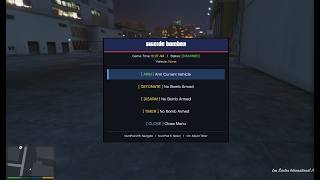
Arm Bomb: Get inside any vehicle, open the menu, and Arm it. The car becomes invincible while armed.
10-Second Detonation: Triggers a 10-second countdown. The car's headlights, taillights, brake lights, and turn signals will flash in perfect sync with a fast-beeping alarm. At zero, it detonates.
Custom Timer: Set a timer from 1 to 120 minutes using the Left/Right arrows. The right-side HUD will show a live countdown.
Massive Blast & Shockwave: The explosion is huge. If you are within 50 feet of the car when it blows up, the blast wave will physically launch you, NPCs, and other vehicles into the air!
Toxic Gas Aftermath: After the explosion, a lingering green toxic gas cloud remains at the blast site for 30 seconds. Anyone who walks into it will rapidly lose health.
Clean UI: The menu is fully centered, modern, and displays the exact in-game time. When the menu is closed, a small prompt at the top of the screen reminds you how to open it.
| :--- | :--- |
| **NumPad 1** | Open / Close the Suicide Bomber Menu |
| **NumPad 8** | Navigate Menu Up |
| **NumPad 2** | Navigate Menu Down |
| **NumPad 5** | Select Menu Option |
| **← / → (Arrows)** | Adjust the Custom Timer Minutes (While on the TIMER option) |
| **NumPad 7** | Quick Disarm (Instantly cancels timers and disarms the bomb) |
Install into GTA V
Open your main GTA V installation folder (where GTA5.exe is located).
Open the scripts folder.
Paste the SuicideBomberMod.dll file inside the scripts folder.
Launch the game!
(Alternative: If you are just saving the code as a .cs file, you can paste SuicideBomberMod.cs directly into the scripts folder, but compiling it to a .dll is highly recommended to prevent errors). Mod Features & How It Works
Arm Bomb: Get inside any vehicle, open the menu, and Arm it. The car becomes invincible while armed.
10-Second Detonation: Triggers a 10-second countdown. The car's headlights, taillights, brake lights, and turn signals will flash in perfect sync with a fast-beeping alarm. At zero, it detonates.
Custom Timer: Set a timer from 1 to 120 minutes using the Left/Right arrows. The right-side HUD will show a live countdown.
Massive Blast & Shockwave: The explosion is huge. If you are within 50 feet of the car when it blows up, the blast wave will physically launch you, NPCs, and other vehicles into the air!
Toxic Gas Aftermath: After the explosion, a lingering green toxic gas cloud remains at the blast site for 30 seconds. Anyone who walks into it will rapidly lose health.
Clean UI: The menu is fully centered, modern, and displays the exact in-game time. When the menu is closed, a small prompt at the top of the screen reminds you how to open it.
Först uppladdad: 6 dagar sen
Senast uppdaterad: 7 timmar sedan
Senast nedladdad: 1 timma sedan
0 Kommentarer
More mods by GamingModz:

- Fordon
- .Net
65
4
0.0.3
By GamingModz
| Key | Action |
| :--- | :--- |
| **NumPad 1** | Open / Close the Suicide Bomber Menu |
| **NumPad 8** | Navigate Menu Up |
| **NumPad 2** | Navigate Menu Down |
| **NumPad 5** | Select Menu Option |
| **← / → (Arrows)** | Adjust the Custom Timer Minutes (While on the TIMER option) |
| **NumPad 7** | Quick Disarm (Instantly cancels timers and disarms the bomb) |
Install into GTA V
Open your main GTA V installation folder (where GTA5.exe is located).
Open the scripts folder.
Paste the SuicideBomberMod.dll file inside the scripts folder.
Launch the game!
(Alternative: If you are just saving the code as a .cs file, you can paste SuicideBomberMod.cs directly into the scripts folder, but compiling it to a .dll is highly recommended to prevent errors). Mod Features & How It Works
Arm Bomb: Get inside any vehicle, open the menu, and Arm it. The car becomes invincible while armed.
10-Second Detonation: Triggers a 10-second countdown. The car's headlights, taillights, brake lights, and turn signals will flash in perfect sync with a fast-beeping alarm. At zero, it detonates.
Custom Timer: Set a timer from 1 to 120 minutes using the Left/Right arrows. The right-side HUD will show a live countdown.
Massive Blast & Shockwave: The explosion is huge. If you are within 50 feet of the car when it blows up, the blast wave will physically launch you, NPCs, and other vehicles into the air!
Toxic Gas Aftermath: After the explosion, a lingering green toxic gas cloud remains at the blast site for 30 seconds. Anyone who walks into it will rapidly lose health.
Clean UI: The menu is fully centered, modern, and displays the exact in-game time. When the menu is closed, a small prompt at the top of the screen reminds you how to open it.
| :--- | :--- |
| **NumPad 1** | Open / Close the Suicide Bomber Menu |
| **NumPad 8** | Navigate Menu Up |
| **NumPad 2** | Navigate Menu Down |
| **NumPad 5** | Select Menu Option |
| **← / → (Arrows)** | Adjust the Custom Timer Minutes (While on the TIMER option) |
| **NumPad 7** | Quick Disarm (Instantly cancels timers and disarms the bomb) |
Install into GTA V
Open your main GTA V installation folder (where GTA5.exe is located).
Open the scripts folder.
Paste the SuicideBomberMod.dll file inside the scripts folder.
Launch the game!
(Alternative: If you are just saving the code as a .cs file, you can paste SuicideBomberMod.cs directly into the scripts folder, but compiling it to a .dll is highly recommended to prevent errors). Mod Features & How It Works
Arm Bomb: Get inside any vehicle, open the menu, and Arm it. The car becomes invincible while armed.
10-Second Detonation: Triggers a 10-second countdown. The car's headlights, taillights, brake lights, and turn signals will flash in perfect sync with a fast-beeping alarm. At zero, it detonates.
Custom Timer: Set a timer from 1 to 120 minutes using the Left/Right arrows. The right-side HUD will show a live countdown.
Massive Blast & Shockwave: The explosion is huge. If you are within 50 feet of the car when it blows up, the blast wave will physically launch you, NPCs, and other vehicles into the air!
Toxic Gas Aftermath: After the explosion, a lingering green toxic gas cloud remains at the blast site for 30 seconds. Anyone who walks into it will rapidly lose health.
Clean UI: The menu is fully centered, modern, and displays the exact in-game time. When the menu is closed, a small prompt at the top of the screen reminds you how to open it.
Först uppladdad: 6 dagar sen
Senast uppdaterad: 7 timmar sedan
Senast nedladdad: 1 timma sedan
Joina konversation! Logga in eller skapa ett konto för att kunna kommentera.
 5mods on Discord
